Verimlilik Zamanlayıcı — Ücretsiz Online Sayaç ve Zaman Yönetimi Rehberi
Verimlilik zamanlayıcıları ile zaman yönetiminde ustalaşın. Kanıtlanmış teknikleri öğrenin, yöntemleri karşılaştırın ve odaklanma ile verimliliği nasıl artıracağınızı keşfedin. Adım adım talimatlar ve gerçek dünya örnekleriyle kapsamlı rehber.
Ücretsiz Online Verimlilik Zamanlayıcı
Hemen bir odak oturumu başlat — indirme yok, kayıt yok. Çalışma zamanlayıcısı, görev zamanlayıcısı veya klasik Pomodoro zamanlayıcısı olarak kullan.
Ücretsiz · Kayıt gerekmezİşine Uygun Zamanlayıcıyı Seç
Farklı görevler farklı zamanlayıcılar ister. Yaptığın işe uygun odaklı aracı seç:
Çalışma Zamanlayıcı
Odak oturumlarını ölçmek ve gün boyu işine odaklı kalmak için basit bir online çalışma zamanlayıcısı.
Çalışma zamanlayıcısını açGörev Zamanlayıcı
Her göreve bir zamanlayıcı ata ve işinin tam olarak ne kadar sürdüğünü takip et — işleri bitirmek için odaklı bir görev saati.
Görev zamanlayıcısını açPomodoro Zamanlayıcı
Kısa molalarla klasik 25 dakikalık odak sprintleri — en popüler verimlilik zamanlayıcı yöntemi.
Pomodoro zamanlayıcısını başlatİçindekiler
Verimlilik Zamanlayıcı Nedir?
Verimlilik zamanlayıcı sadece bir geri sayım saati değildir. Zamanı etkili yönetmenize, odaklanmayı sürdürmenize ve tutarlı çalışma alışkanlıkları oluşturmanıza yardımcı olan yapılandırılmış bir sistemdir. Normal zamanlayıcılardan farklı olarak, verimlilik zamanlayıcıları zamanlamayı Pomodoro yöntemi, zaman bloklama veya derin çalışma oturumları gibi tekniklerle birleştirir.
Bu araçlar, çalışmayı yönetilebilir aralıklara bölmeye, dinlenme sürelerini zorunlu kılmaya ve zamanla ilerlemeyi takip etmeye yardımcı olur. Soyut zaman yönetimi kavramlarını somut, uygulanabilir pratiklere dönüştürürler.
Anahtar İçgörü: Verimlilik zamanlayıcıları, iç motivasyon zor olduğunda dış yapı oluşturarak çalışır. Zamanlayıcı, başlamanıza, odaklanmayı sürdürmenize ve gerekli molaları almanıza yardımcı olan hesap verebilirlik ortağınız olur.
Verimlilik Zamanlayıcıları Neden İşe Yarar?
Verimlilik zamanlayıcıları odaklanmayı ve çıktıyı iyileştirmek için psikoloji ve sinirbilimden yararlanır. İşte neden etkili oldukları:
Odaklanma ve Konsantrasyonu İyileştirir
Zaman kutusu aciliyet yaratır ve karar yorgunluğunu ortadan kaldırır. Sınırlı bir zaman pencereniz olduğunu bilmek, dikkat dağıtıcıları ortadan kaldırmaya ve oturum boyunca derin odaklanmayı sürdürmeye yardımcı olur.
Verimliliği Artırır
Çalışmayı aralıklara bölmek zihinsel yorgunluğu önler ve tutarlı çıktı sağlar. Çalışmalar, yapılandırılmış çalışma oturumlarının yapılandırılmamış maratonlardan daha yüksek kaliteli işe yol açtığını gösteriyor.
Hesap Verebilirlik Yaratır
Zamanlayıcı dış bir hesap verebilirlik mekanizması görevi görür. Motivasyon zayıfladığında, tıklayan saat başlamanız ve çalışmaya devam etmeniz için yapı sağlar.
Tükenmişliği Önler
Verimlilik zamanlayıcıları tarafından zorunlu kılınan düzenli molalar zihinsel tükenmeyi önler. Bu, gün boyunca azalan getiri olmadan sürdürülebilir verimlilik sağlar.
En İyi Verimlilik Zamanlayıcı Teknikleri
Farklı verimlilik zamanlayıcı teknikleri farklı çalışma stilleri ve hedeflere uygundur. İşte en etkili yöntemler:
Pomodoro Tekniği
Francesco Cirillo tarafından geliştirilen Pomodoro Tekniği, 5 dakikalık molalarla takip edilen 25 dakikalık çalışma aralıkları kullanır. Dört Pomodoro'dan sonra, daha uzun 15-30 dakikalık bir mola verin. Bu yöntem odaklanmayı sürdürmek ve tükenmişliği önlemek için idealdir.
Nasıl çalışır:
- Üzerinde çalışılacak bir görev seçin
- Zamanlayıcıyı 25 dakika için ayarlayın
- Zamanlayıcı çalana kadar çalışın
- 5 dakikalık bir mola verin
- 4 Pomodoro'dan sonra, 15-30 dakikalık uzun bir mola verin
Zaman Bloklama
Zaman bloklama, gününüzü farklı aktiviteler için belirli zaman dilimlerine bölmeyi içerir. Her blok tek bir göreve veya görev kategorisine ayrılmıştır. Bu yöntem net bir program oluşturmaya yardımcı olur ve bağlam değiştirmeyi azaltır.
Derin Çalışma Oturumları
Cal Newport tarafından popülerleştirilen derin çalışma, uzun süreli odaklanmış, dikkat dağıtıcısız çalışma dönemlerini içerir. Oturumlar tipik olarak 60-90 dakika sürer ve karmaşık görevlerde derin konsantrasyona izin verir.
Teknik Karşılaştırması
| Teknik | En İyi | Oturum Süresi |
|---|---|---|
| Pomodoro | Genel odaklanma, tükenmişliği önleme | 25 dakika |
| Zaman Bloklama | Günlük planlama, görev organizasyonu | Değişken (30dk - 2saat) |
| Derin Çalışma | Karmaşık görevler, yaratıcı iş | 60-90 dakika |
Doğru Verimlilik Zamanlayıcısını Nasıl Seçersiniz?
Tüm verimlilik zamanlayıcıları eşit yaratılmamıştır. Bir araç seçerken arayacağınız şeyler:
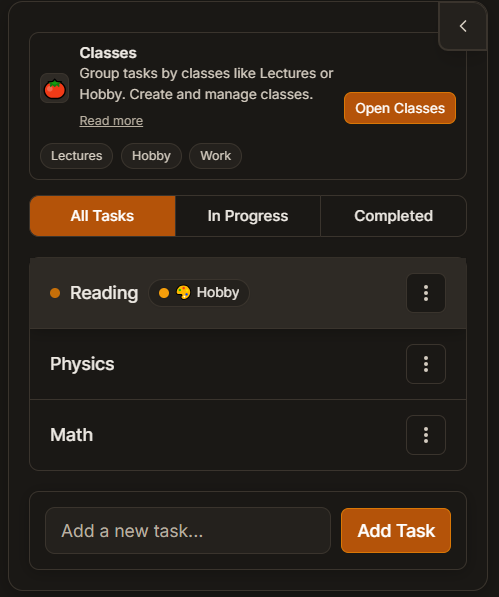
Görev Bazlı Takip
En iyi verimlilik zamanlayıcıları, sadece toplam saatleri değil, görev bazında zamanı takip etmenize izin verir. Bu, odaklanmanızın gerçekte nereye gittiğini anlamanıza ve hangi görevlerin en fazla zaman tükettiğini belirlemenize yardımcı olur.
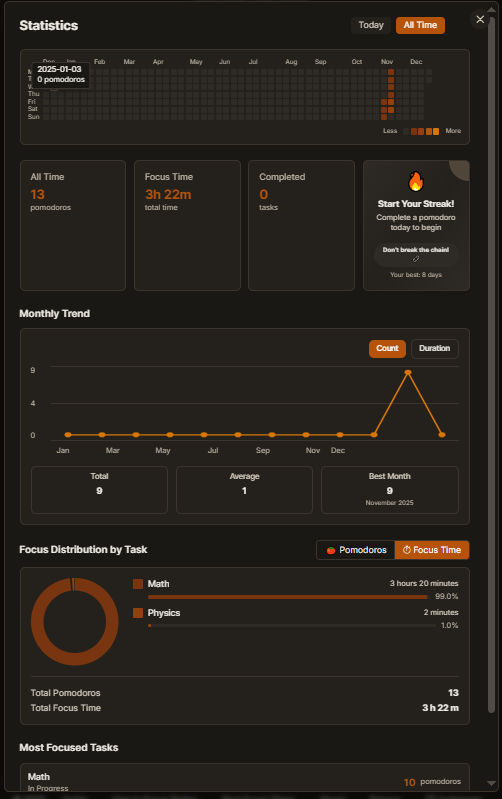
Analitikler ve İçgörüler
Detaylı analitikler sağlayan zamanlayıcılar arayın: yıllık ısı haritaları, günlük odaklanma dağılımları ve görev dökümleri. Bu içgörüler programınızı optimize etmenize ve zirve verimlilik saatlerini belirlemenize yardımcı olur.
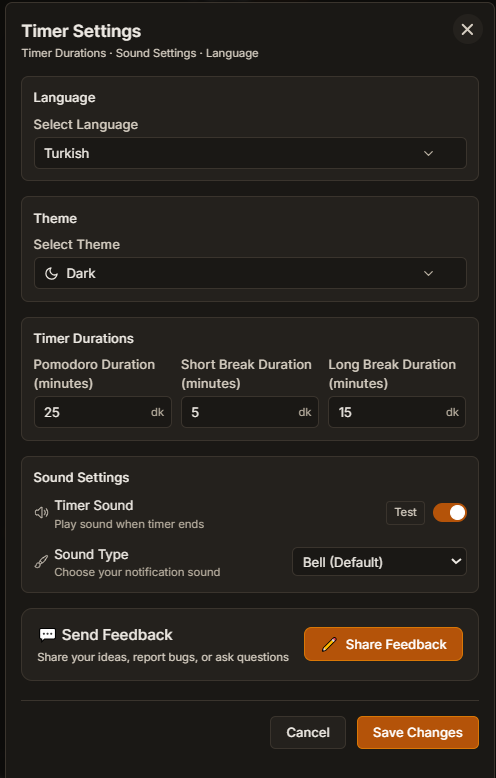
Özelleştirme Seçenekleri
Etkili verimlilik zamanlayıcıları, oturum ve mola sürelerini ayarlamanıza izin verir. Herkesin odaklanma kapasitesi farklıdır - araç size uyum sağlamalı, tersi değil.
Adım Adım: Başlangıç
Verimlilik zamanlayıcı kullanmaya başlamaya hazır mısınız? Bu yol haritasını takip edin:
1. Gün: Kurulum ve İlk Oturum
Bir verimlilik zamanlayıcı aracı seçin (PomoClass gibi), ilk görevinizi ayarlayın ve bir 25 dakikalık oturum tamamlayın. Mükemmellik konusunda endişelenmeyin - sadece başlayın.
1. Hafta: Alışkanlığı Oluşturun
Günde en az bir odaklanmış oturum hedefleyin. Oturumlarınızı takip edin ve kalıpları fark etmeye başlayın. Hangi hedeflerin tutarlı ilgi gördüğünü görmek için görev bazlı takibi kullanın.
1. Ay: Optimize Edin ve İyileştirin
Analitiklerinizi gözden geçirin. Zirve odaklanma saatlerinizi belirleyin ve programınızı buna göre ayarlayın. Sizin için en iyi olanı bulmak için farklı oturum uzunluklarını deneyin.
Yaygın Hatalar ve Nasıl Önlenir
Verimlilik zamanlayıcıları kullanırken bu yaygın tuzaklardan kaçının:
Aşırı Planlama
Gününüzü arka arkaya oturumlarla doldurmayın. Görevler arasında tampon süre bırakın ve beklenmedik kesintiler için hesap yapın. Gerçekçi planlama tükenmişliği önler.
Molaları Görmezden Gelme
Molalar isteğe bağlı değildir - odaklanmayı sürdürmek için gereklidir. Molaları atlamak azalan getiriye ve zihinsel yorgunluğa yol açar. Mola zamanınıza saygı gösterin.
İlerlemeyi Takip Etmeme
Takip olmadan optimize edemezsiniz. Hangi aktivitelerin en fazla ilgi gördüğünü görmek ve iyileştirme alanlarını belirlemek için görev bazlı takibi kullanın.
Verimlilik Zamanlayıcı vs Diğer Yöntemler
Verimlilik zamanlayıcıları diğer zaman yönetimi yaklaşımlarıyla nasıl karşılaştırılır?
vs Takvim Uygulamaları
Takvim uygulamaları gününüzü planlar, ancak verimlilik zamanlayıcıları planlanan süre boyunca odaklanmayı zorunlu kılar. Takvimler ne zaman çalışacağınızı planlar; zamanlayıcılar o sırada gerçekten çalışmanıza yardımcı olur.
Sonuç: Her ikisini de kullanın - planlama için takvimler, uygulama için zamanlayıcılar.
vs Görev Yöneticileri
Görev yöneticileri ne yapılacağını organize eder, verimlilik zamanlayıcıları ise ne kadar süre yapılacağına odaklanır. Görev yöneticileri ertelemeyi önleyen zaman yapısından yoksundur.
Sonuç: Verimlilik zamanlayıcıları zaman yapısı ekleyerek görev yöneticilerini tamamlar.
vs Manuel Takip
Manuel takip (kalem ve kağıt gibi) otomasyon ve içgörülerden yoksundur. Verimlilik zamanlayıcıları, manuel yöntemlerin eşleşemeyeceği otomatik takip, analitikler ve hatırlatıcılar sağlar.
Sonuç: Dijital zamanlayıcılar takip ve analitiklerde avantajlar sunar.
Gerçek Dünya Kullanım Örnekleri
Verimlilik zamanlayıcıları farklı meslekler ve durumlarda çalışır:
Öğrenciler İçin
Öğrenciler, çalışma oturumlarını yönetilebilir parçalara bölmek, ders başına zamanı takip etmek ve tutarlı çalışma alışkanlıkları oluşturmak için verimlilik zamanlayıcıları kullanır. Görev bazlı takip, hangi derslerin daha fazla ilgi gerektirdiğini belirlemeye yardımcı olur.
Öğrenciler için Pomodoro hakkında daha fazla bilgi edininGeliştiriciler İçin
Geliştiriciler, kodlama oturumları sırasında akış durumunu sürdürmek, özellik başına zamanı takip etmek ve uzun geliştirme döngüleri sırasında tükenmişliği önlemek için verimlilik zamanlayıcıları kullanır.
Freelancer'lar İçin
Freelancer'lar, faturalandırılabilir saatleri takip etmek, birden fazla proje arasında odaklanmayı sürdürmek ve dış yapı olmadan tutarlı çalışma alışkanlıkları oluşturmak için verimlilik zamanlayıcıları kullanır.
Uzaktan Çalışanlar İçin
Uzaktan çalışanlar, esnek programlarda yapı oluşturmak, iş ve kişisel zaman arasındaki sınırları korumak ve ofis denetimi olmadan verimli kalmak için verimlilik zamanlayıcıları kullanır.
Maksimum Verimlilik İçin İleri İpuçları
Temelleri öğrendikten sonra, bu ileri stratejileri deneyin:
Teknikleri Birleştirme
Günlük görevler için Pomodoro, planlama için zaman bloklama ve karmaşık projeler için derin çalışma oturumları kullanın. Farklı teknikler farklı durumlara uygundur.
Enerji Yönetimi
Önemli işleri zirve saatlerinizde (analitiklerle belirlenen) planlayın ve rutin görevleri düşük enerji dönemlerinde planlayın. Görev zorluğunu enerji seviyeleriyle eşleştirin.
Alışkanlık Yığınlama
Verimlilik zamanlayıcı oturumlarını mevcut alışkanlıklarla eşleştirin. Örneğin, 'Sabah kahvemden sonra bir Pomodoro oturumu yapacağım.' Bu, başlamayı kolaylaştıran doğal tetikleyiciler oluşturur.
Sık Sorulan Sorular
Verimlilik zamanlayıcı ile normal zamanlayıcı arasındaki fark nedir?
Verimlilik zamanlayıcıları zamanlamayı kanıtlanmış tekniklerle (Pomodoro gibi) birleştirir, görev takibi, analitikler sağlar ve alışkanlık oluşturmaya yardımcı olur. Normal zamanlayıcılar sadece zamanı geri sayar.
Verimlilik zamanlayıcı oturumları ne kadar uzun olmalı?
25 dakika (Pomodoro standardı) ile başlayın ve odaklanma kapasitenize göre ayarlayın. Bazı insanlar 15 dakikalık oturumlarla daha iyi çalışır, diğerleri 50 dakikalık derin çalışma bloklarıyla.
Mola almak zorunda mıyım?
Evet, molalar gereklidir. Zihinsel yorgunluğu önlerler ve tutarlı verimlilik sağlarlar. Molaları atlamak azalan getiriye ve tükenmişliğe yol açar.
Verimlilik zamanlayıcıları DEHB'ye yardımcı olabilir mi?
Evet! Verimlilik zamanlayıcıları odaklanma zorluklarına yardımcı olan dış yapı sağlar. Kısa oturumlarla (10-15 dakika) başlayın ve kapasite iyileştikçe kademeli olarak artırın.
Tüm görevler için aynı oturum uzunluğunu kullanmalı mıyım?
Mutlaka değil. Karmaşık görevler daha uzun derin çalışma oturumları gerektirebilir, basit görevler ise kısa Pomodoro oturumlarıyla iyi çalışır. Görev karmaşıklığına göre ayarlayın.
Verimlilik zamanlayıcı ile ilerlemeyi nasıl takip ederim?
Hangi hedeflerin tutarlı ilgi gördüğünü görmek için görev bazlı takibi kullanın. Programınızı optimize etmek ve kalıpları belirlemek için analitikleri düzenli olarak gözden geçirin.
Oturum sırasında dikkat dağılırsa ne yapmalıyım?
Dikkat dağılırsa, not edin ve görevinize dönün. Dikkat dağıtıcı acilse, oturumu iptal edin ve yeni bir tane başlatın. Kayıp zamanı 'telafi etmeye' çalışmayın.
Verimlilik zamanlayıcılarını ekip çalışması için kullanabilir miyim?
Evet, senkronize verimlilik zamanlayıcı oturumları, ekiplerin işbirlikçi çalışma sırasında odaklanmayı sürdürmesine yardımcı olabilir. Ancak, bireysel oturumlar genellikle grup oturumlarından daha iyi çalışır.
PomoClass'ı Ücretsiz Verimlilik Zamanlayıcın Olarak Kullan
İndirme yok, reklam yok, kredi kartı yok. Görev takibi, seriler, analitikler ve yapay zeka koçu dahil — saniyeler içinde zamanlayıcını başlat.
İlgili Rehberler
İş Zamanlayıcı — Çalışmak İçin Ücretsiz Online Odak Zamanlayıcı
Odaklanmana, ertelemeyi yenmene ve daha fazlasını yapmana yardımcı olan ücretsiz online iş zamanlayıcı. Odaklı bir çalışma oturumunu hemen burada başlat — indirme yok, kayıt gerekmez.
Görev Zamanlayıcı — Görevler ve Yapılacaklar İçin Ücretsiz Online Zamanlayıcı
Her odak oturumunu bir göreve bağlayan ücretsiz online görev zamanlayıcı — böylece zamanının nereye gittiğini tahmin etmeyi bırakır ve yapılacaklar listeni gerçekten bitirirsin. Hemen burada başla, kayıt gerekmez.
Pomodoro Tekniği: Verimlilik ve Odaklanma İçin Kapsamlı Rehber
1980'lerden beri milyonlarca kişi tarafından kullanılan kanıtlanmış zaman yönetimi yöntemi. Odaklanmayı artırın, ertelemeyi azaltın ve sürdürülebilir verimlilik alışkanlıkları oluşturun.
Daha İyi Nasıl Odaklanılır: İşe Yarayan Pratik Teknikler
Dikkat dağıtıcılar her yerde. İşte daha güçlü odaklanma alışkanlıkları oluşturmanın ve en önemli olduğunda konsantrasyonu sürdürmenin yolları.
En İyi Odaklanma Zamanlayıcı Uygulamasını Ne Yapar
İyi bir odaklanma zamanlayıcı sadece geri sayım yapmaz. Alışkanlıklar oluşturmanıza, ilerlemeyi takip etmenize ve verimlilik kalıplarınızı anlamanıza yardımcı olur. İşte etkili araçları basit zamanlayıcılardan ayıran şeyler.
Pomodoro Programı: 25/5, 50/10, 90/20 Örnekleri
Enerjine, iş tipine ve gün akışına uygun Pomodoro ritmini seç.
Verimlilik zamanlayıcını hemen başlat
Ücretsiz, indirme yok, reklam yok.
Devam ederek Kullanım Koşulları'nı ve Gizlilik Politikası'nı kabul etmiş olursunuz.